
Welcome to the Fall 2024 edition of Technology Roundup! This resource is released every Spring and Fall semester to keep our community of educators informed on the latest available instructional technologies that are supported by the university.
Table of Contents
- AI Resources
- Tech Tools for Active Learning
- Tech Tools for Collaborative and Cooperative Learning
- Tech Tools for Creating and Working with Content
- Tech Tools for Immersive Learning
- Classroom Technology Resources
AI Resources
The TLC has curated a collection of generative AI topics, including its impact on the classroom and potential instructional uses. Check out the Generative AI page of the TLC website to browse these resources.
Tech Tools for Active Learning
Active learning is an educational approach that emphasizes student active engagement and participation in the learning process. This may involve activities such as group discussions, problem-solving exercises, hands-on activities, and case studies. Using the tools listed below, educators can design learning activities in which students can actively discover, process, and apply concepts they are learning.

H5P
H5P is an online tool that allows users to build interactive learning activities which can be embedded into D2L Course Module Pages, or anywhere that supports HTML. H5P’s D2L integration allows faculty to connect H5P activities to the D2L Gradebook and generate completion reports. Check out some examples of what H5P can do: Sample H5P Activities Google Site
New Features
H5P has recently released two new features that are now included in our license:
- Open Education Resource (OER) Hub: Users can access and use H5P activities created by other authors around the world! Check out H5P’s website to learn more.
- Live Engagement Tools: With H5P’s Live Engagement Tools, users can run live polls and games. There are four types of Live Engagement Tools. Click on the corresponding link to learn about each type of Live Engagement Tool:

Poll Everywhere
Poll Everywhere is an online audience response system that allows instructors to engage students through live polling, surveys, Q&As, quizzes, word clouds, and more! Poll Everywhere’s D2L Integration allows instructors to import Poll Everywhere Data to the D2L Gradebook.
New! Course Management Feature
The new course management feature allows instructors to assign Poll Everywhere activities to specific courses and more easily control the point value assigned to grades imported to D2L. To learn more about the new Course Management feature check out these resources:
Creator+
Creator+ is a suite of tools available in D2L that allows instructors to easily add dynamic content and interactive activities directly to their course module pages. With its easy-to-use tools and integration into existing workflows, creators can develop dynamic content and media that enhance learning comprehension and engagement for both instructors and learners.
Check out the D2L Course Design Resources Site for live samples and Creator+ resources!
Tech Tools for Collaborative and Cooperative Learning
Collaborative and cooperative learning are educational approaches that emphasize teamwork and interaction among students to achieve shared learning goals. These methods promote communication, problem-solving, and interpersonal skills. The following tools are excellent options for supporting collaborative and cooperative learning activities.

Padlet
Padlet is an online collaboration tool that allows users to create virtual boards where they can post and organize content, such as text, images, videos, and links. Padlet’s user-friendly interface and customizable templates make it a versatile tool for various activities, including group projects, discussions, and presentations. Padlet’s D2L Integration allows instructors to easily embed or link to content from their course, streamlining access for students. Check out the Padlet Page of the TLC’s website to learn more!
New Features
Check out this brief video from Padlet for an overview of 10 new features that were released between September and December: Padlet 2024 Autumn Release (01:20)

VoiceThread
VoiceThread is an interactive multimedia platform that allows users to create and share collaborative presentations and discussions that may incorporate images, documents, videos, and audio commentary. VoiceThread’s D2L Integration allows instructors to add VoiceThread Assignments to the Content section of their D2L Course Site that link to the Gradebook. Check out this VoiceThread Overview Video for a brief demo of this tool.
Tech Tools for Creating and Working with Content
Creating and working with content from a faculty perspective involves designing and delivering instructional materials that engage students and facilitate learning. This might include graphics that illustrate important processes or concepts for increased understanding, instructional videos, and other multimedia. The following tools are great choices for supporting creating and working with content in your courses.
D2L Homepage and Module Page Templates
A library of D2L homepage and module page templates is available for all WCU faculty to copy from the D2L Course Design Resources site. Visit the D2L Course Design Resources site to look through style guides and instructions for how to copy a homepage or module page template to your own course. Need help copying or customizing a template? Contact your assigned instructional designer or email the TLC at tlc@wcupa.edu.
Adobe Express
Adobe Express is a user-friendly graphic design tool that allows users to create a wide range of visual content, such as presentations, flyers, graphics, and videos. This tool enables both beginners and experienced designers to produce professional-quality designs quickly and easily. Adobe Express also offers collaboration features, making it ideal for educational and team projects where multiple users can contribute to and edit designs. All faculty and students may access Adobe Express using their WCU credentials. For support with this tool, contact the IS&T Help Desk.
Tech Tools for Immersive Learning
Immersive learning is an educational approach that uses technology to create engaging, interactive environments that simulate real-world experiences. Leveraging tools like virtual reality (VR), augmented reality (AR), and simulations allows students to actively participate in their learning process, providing them with hands-on experiences that enhance understanding and retention of complex concepts. Learn more about some tools available at WCU to support immersive learning below.
Meta Quest 2 VR Headsets
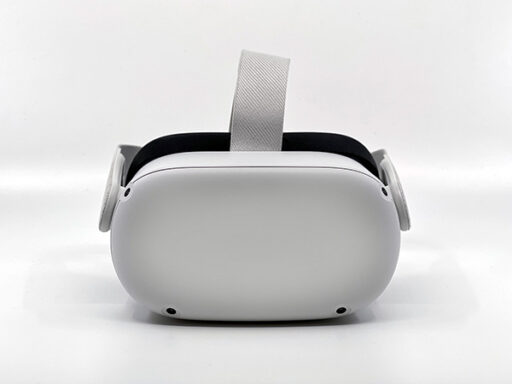
The Teaching & Learning Center has a class set of 20 Meta Quest 2 VR headsets available for loan. Faculty members who would like to facilitate in-class VR scenarios or activities may contact Jessica Drass at jdrass@wcupa.edu to make a reservation.
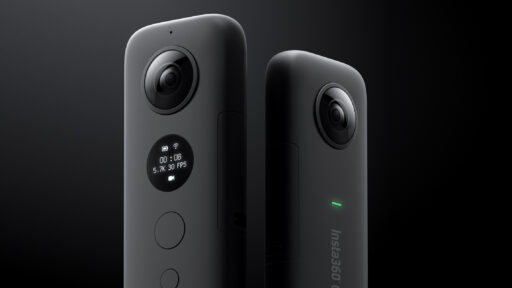
360 Camera
The Teaching & Learning Center also has a 360 camera that can be used to produce custom AR and VR learning experiences. If you are interested in exploring ways that AR and VR may be applied in your instruction, contact your assigned instructional designer, or email the TLC at tlc@wcupa.edu.
Classroom Technology Resources
Many classrooms across campus are equipped with projectors, screens, microphones, and cameras. Check out the Classroom Technology Directory to learn what technology is available in your classroom. For personalized training on classroom technology, request a one-on-one Multimedia Consultation through ServiceNow. Contact Registrar Space Management to request a room with specific technology
